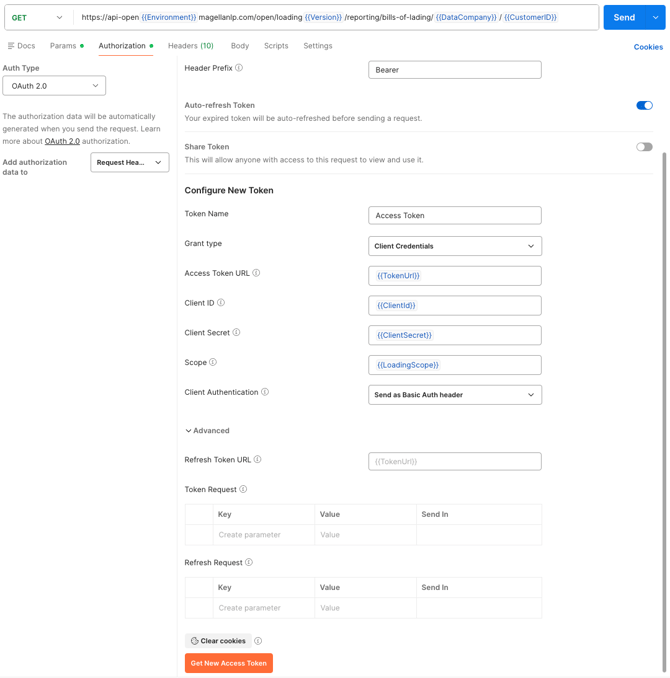
With a valid token and API endpoint, the only additional information required is a subscription key.
Obtain this by visiting your profile on our developer website: https://developers.magellanlp.com/profile.

For each subscription, you will find Primary and Secondary key fields. Click "show" to reveal one of these keys and use it as your subscription key.
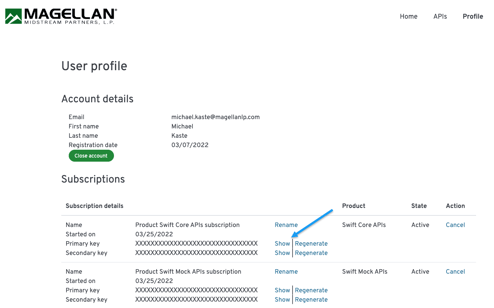
You are now ready to make a call.
1- A valid API call consists of an HTTP GET request to your chosen endpoint with two header values: the subscription key and the authorization token.
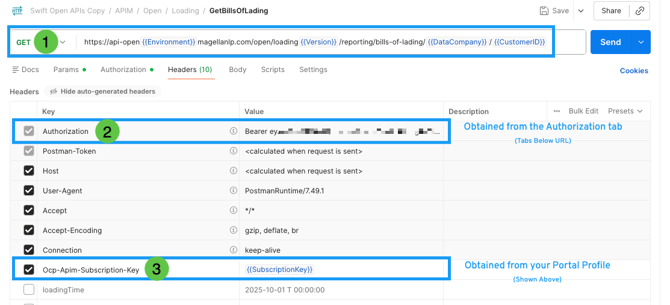
2- For the authorization token, include the word "Bearer" followed by a space before your token.
3 - Subscription key is obtained in the Developers Portal in your Profile (see image above)
The required headers are named "Ocp-Apim-Subscription-Key" for the subscription key and "Authorization" for the authorization token.
You can use any API Interface tool of making HTTP GET requests to make API calls. Below is a template for a valid API request using cURL:
- curl -X GET https://api-open.magellanlp.com/open/inventory/reporting/additive-reconciliation/historical/1/209 -H "Authorization: bearer your-token-here" -H "Ocp-Apim-Subscription-Key: your-subscription-key-here"
Below is an example of a request using Postman's built-in authorization feature. Ensure you replace the client information with your company's unique values and add the subscription key in the request headers.