
Start with this question: What are you trying to control?
|
Your goal: |
Set the restriction on the: |
|
Limit which customers a carrier can load for |
Carrier Authorization |
|
Limit which carriers can load for a customer |
Customer Authorization |
See Which Authorization Restriction Should I Use? for example restriction scenarios.
Who is this for?
Customer Restrictions are for Suppliers who want to control which Customers a specific Carrier is allowed to load for at a specific terminal.
What is a Customer Restriction?
Customer Restrictions in a Carrier Authorization allows you to limit a Carrier to only utilize LCNs for specific Customer(s) at the authorized terminal. This provides precise control over carrier activity and ensures carriers only load for customers they are approved for.
A Customer Restriction allows you to select one or more Customers that a carrier is allowed to load for at the authorized location.
When a Customer Restriction is enabled:
- The Carrier can only utilize the LCNs belonging to Customers you select for the restricted Carrier Authorization, therefore they are only allowed to load for those customers at the authorized location.
- Any attempt to use a LCN belonging to a customer not listed on the restricted Carrier Authorization will be denied.
Customer Restrictions do not control:
- Which carriers a customer allows to load for them
- Carrier activity at other terminals where no restrictions are set
Note: To restrict which carriers are allowed to load for a specific Customer, see Customer Authorizations: Carrier Restrictions
How is this used?
Use a Customer Restriction on a Carrier Authorization when a carrier should only load for specific customers at the authorized terminal.
How it works
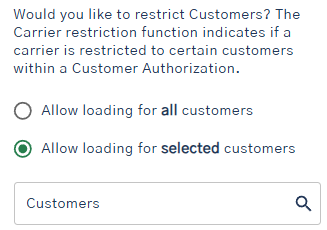
- Open the Carrier Authorization for the carrier and terminal
- Choose Allow loading for selected customers
- Select one or more customers
- Save the authorization
Example of how it works
A Carrier is approved to load at Terminal A but should only load for Customer X and Customer Y.
You set a Customer Restriction on the Carrier Authorization and select:
- Customer X
- Customer Y
Result:
- The Carrier can use the LCNs for Customer X and Customer Y to load at the terminal.
- Any attempt to use a LCN belonging to other customers at that terminal will be denied
- The Carrier can use LCNs for all customers at other terminals if they are not restricted there.
Important Notes
- Customer Restrictions apply only to the Carrier Authorization where they are set
- Restrictions are specific to the terminal
- The Carrier must have an active Carrier Authorization for that terminal
- The Customer must be authorized for that terminal.
- If no Customer Restriction is set, the Carrier can utilize LCNs for all customers authorized at that location