
Most Swift users ship on Magellan pipeline systems, and those systems send notifications about terminal allocation changes, planned maintenance, and unplanned outages. Notifications are opt-in, so you will not receive them until you subscribe. Turning them on takes about a minute, and we recommend it for every Swift user.
Prerequisites
- Ability to sign in to the Notifications portal at notifications.magellanlp.com
- For text alerts: a mobile number on your profile. Standard text-messaging rates apply.
Steps
1. Open the Notifications portal
Go to notifications.magellanlp.com and sign in.
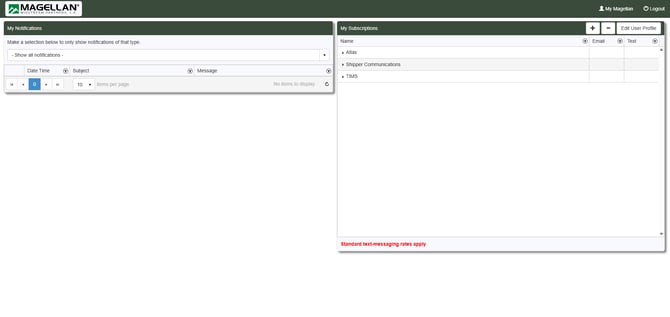
2. Find My Subscriptions
In the My Subscriptions panel on the right, you will see grouped categories: Atlas, Shipper Communications, and TIMS.
3. Expand Shipper Communications
Click the arrow next to Shipper Communications to expand the group.
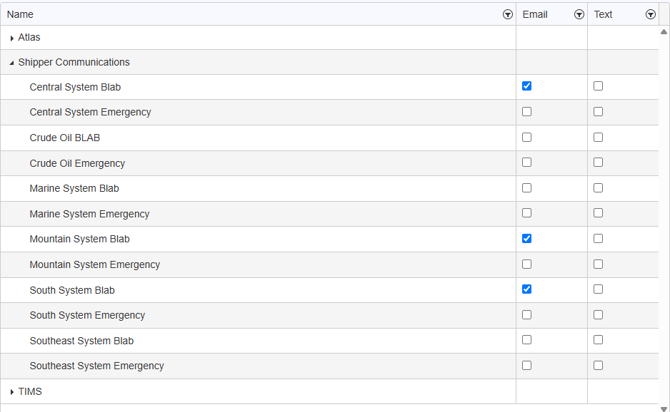
4. Subscribe to the three system advisories
Tick the Email box (and Text, if you want it) for each of these:
- Central System Blab
- Mountain System Blab
- South System Blab
These cover the refined-products systems most Swift users ship on. For urgent-only alerts, also tick the matching Emergency option under each system.
5. Confirm your selections
Your choices show as checked boxes. Re-open the portal later to confirm they saved, and update them any time.
Tips & important notes
Note: Notifications are opt-in. If you do not subscribe, you will not be alerted about maintenance or outages.
Tip: Choose Email at a minimum. Add Text for the most time-sensitive systems, keeping in mind that standard text-messaging rates apply.
Tip: The other groups (Atlas and TIMS) carry different notifications. Subscribe to those only if they apply to your work.
Contact the ONEOK Service Desk: 833-ONEOKIT (833-663-6548).
When calling, have ready:
- Your name and username email
- Company name
- The subscription you were trying to turn on