
🐞 Bug Fixes: Six (6)
- Inventory: PTO
- Shipping: Monthly Nominations
- Loading: Self & Customer Authorization
📣 Enhancements: Seven (7)
BUG FIXES
-
Inventory > PTO: Transfer Date Display: Fixed incorrect transfer date display in the Edit PTO screen for users outside of Central Time.
- Monthly Nominations
- 'View-Only' users no longer see actionable functions: Edit, Elect and Copy.
- Fixed the navigation bug requiring two clicks of the browser's back button to exit the Nomination page.
- Loading > Customer Authorizations
- Resolved the issue preventing retrieval of 1 Vol Monthly authorizations.
- 'Save' button now correctly remains disabled even when required fields lack valid input.
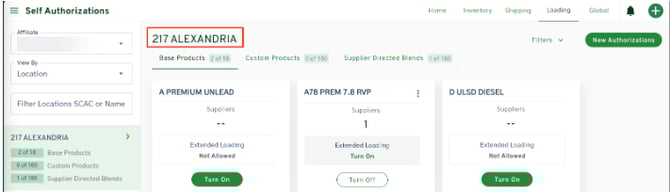
- Loading > Self Authorizations: The card panel title no longer incorrectly changes to "Self Authorizations" when users filter, preserving clarity of selected Location or Product.
ENHANCEMENTS
Product Transfer Orders (PTOs)
Future-Dated PTO: Users can now create PTOs even when fulfillment volume is insufficient, as long as the Transfer Date is in the future.
- Inventory Check Improvements
-
- PTOs no longer validate against current inventory at the time of creation.
- Inventory volumes are now checked based on the requested Transfer Date, not the submission date.
- When selecting a future Transfer Date, inventory volumes will not be displayed during Step 2.
- Future-Date PTO Workflow:
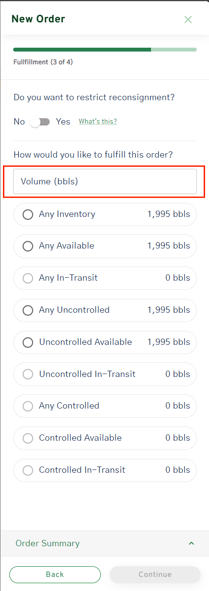
- The Transfer Volume input has moved to the Fulfillment step. This allows users to enter volumes while viewing available inventory at the selected location.
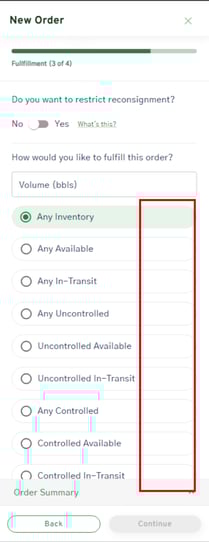
- In the current workflow, volume entry and inventory status selection appear on the same page.
- In the future-dated PTO workflow, inventory volumes are hidden next to inventory status sections. (red box below.)
All of Swift: Entire Application
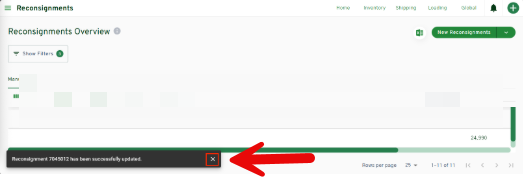
- In all screens throughout Swift, users can now manually dismiss success notifications by clicking the 'x,' without waiting for Swift to auto-dismiss.
Global Data: Points & Products
- Now displays correct point IDs and filter records to show only the MPL dataCompany (Refined Products business).
- Global Points = comprehensive list of ONEOK Refined Products Terminal Names and ID)
- Global Products = comprehensive list of all products, including the corresponding PIDX code)
Reconsignments
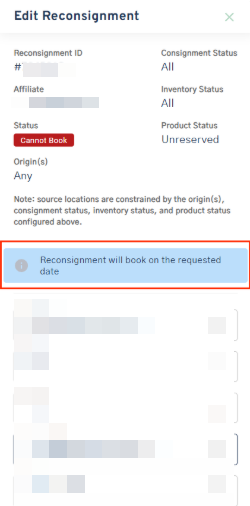
- When a Reconsignment cannot be booked, the Edit pop-out now displays the reason, helping users understand what’s preventing the booking.
Inventory Reports
- Bill of Ladings Report > The 'Load End Date' automatically defaults to the current date when generating these reports; this ensures accuracy and timely-data retrieval.