
What is the SSA and why is it required?
The Carrier System Services Agreement (SSA) is a legal agreement between your carrier company and ONEOK that covers access to the Swift Dispatch web application. New functionality and services for refined fuel carriers are delivered through Swift Dispatch, and the SSA establishes the terms and conditions that protect both your company and ONEOK.
Your company cannot access Swift Dispatch until the SSA has been signed. This is a one-time onboarding step required for all carrier companies.
Who can sign the SSA?
Anyone at your company with the authority to execute terms and conditions on behalf of the organization can sign the SSA. The signing is completed digitally using your myMagellan Portal credentials — no separate account is needed.
How to Sign the SSA
To sign your service agreement, follow the steps below:
- Login to myMagellan Portal using your ATLAS username (email address) and password.
- Navigate to the Carrier App.
- Under My Carriers, click into your Carrier company.
- Tip: You can start typing your carrier company name in the My Carriers list to quickly narrow your search.
- Locate the Service Agreements module. Click the Actions button in the upper-right corner of that module.
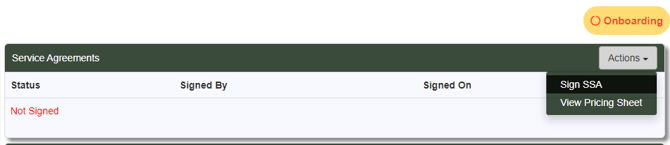
- Click Sign SSA and review the embedded PDF document carefully.
- Enter your Portal user ID or email address and password to digitally sign the agreement. These are the same credentials used to log in to the myMagellan Portal.
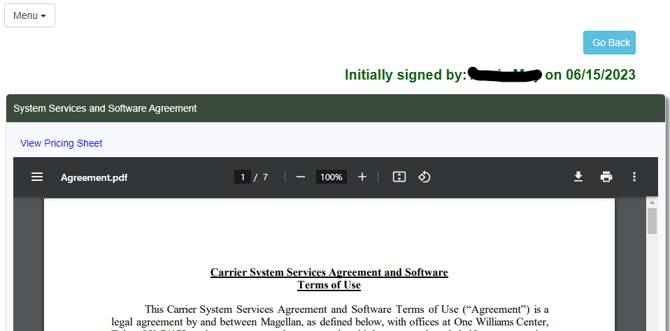
- You’re done!
Confirming Your Signature
Once an authorized member of your company has digitally signed, the Service Agreements module will update to show a confirmed status. The confirmed status will display the signing user's name and the date the agreement was executed. 