
Start with this question: What are you trying to control?
|
Your goal: |
Set the restriction on the: |
|
Limit which carriers can load for a customer |
Customer Authorization |
|
Limit which customers a carrier can load for |
Carrier Authorization |
See Which Authorization Restriction Should I Use? for example restriction scenarios.
Who is this for?
Carrier Restrictions are for Suppliers who want to control which carriers are allowed to load for a specific customer.
What is a Carrier Restriction?
Carrier restrictions in Customer Authorizations allow you to explicitly control which carriers are allowed to load for a customer. This ensures only approved carriers can use that customer’s Loading Control Numbers (LCNs) and provides clear, predictable control at the terminal.
A carrier restriction allows you to select one or more carriers that are allowed to load for that customer.
When a carrier restriction is enabled:
- Only the carriers you select can utilize the LCNs for the restricted Customer Authorization, therefore they are the only ones allowed to load for that customer.
- Any carrier not on the restricted list will be denied if attempting to load for the restricted Customer Authorization.
Carrier Restrictions do not control:
- Which customers a carrier can load for
- Carrier activity for other customers
Note: To restrict authorized carriers to loading only for specific Customers, see Carrier Authorizations: Customer Restrictions
How is this used?
Use a Carrier Restriction on a Customer Authorization when:
- A customer requires specific approved carriers
- You want to prevent unapproved carriers from loading for that customer
How it works
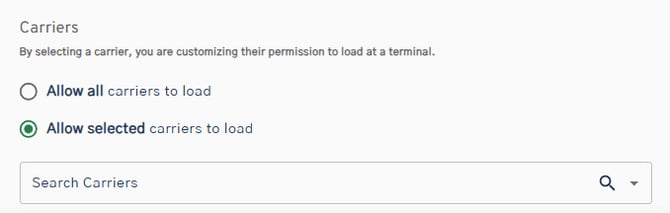
- Choose Allow selected carriers to load when creating or editing a Customer Authorization
- Select one or more carriers
- Save the authorization
Example of how it works
You have a customer who only uses Carrier A and Carrier B.
You set a carrier restriction on that customer's authorization and select:
- Carrier A
- Carrier B
Result:
- Carrier A and Carrier B can load
- Any other carrier will be denied when attempting to load for that customer
Important Notes
- Carrier restrictions apply only to the Customer Authorization where they are set
- Carriers must still have an active Carrier Authorization for your company and the terminal
- You can select one carrier or multiple carriers
- If no carrier restriction is set, all authorized carriers can load for the customer if they have the Loading Control Numbers (LCNs) for the customer